Score Sleep Stages with YASA
Description
The YASA tool automatically detects sleep stages from polysomnography (PSG) files. It processes the entire recording in 30-second epochs, assigning a sleep stage to each epoch. The tool can perform detection using a single EEG electrode, with central electrodes (e.g., C3, C4) being preferred.
To enhance the algorithm’s performance, you can optionally include one EOG (electrooculography) and one EMG (electromyography) channel, which can improve classification accuracy. For more details, refer to the official YASA documentation: https://raphaelvallat.com/yasa/.
Additionally, in Snooz, you can select up to four high-priority EEG channels as input. This allows the tool to determine the result with the highest confidence for each channel.
Note
Based on the internal analysis of Snooz, configurations combining central channels with one frontal and one occipital channel typically demonstrate marginally better performance.
Algorithm Details
The YASA sleep staging algorithm is an open-source tool trained on over 30,000 hours of polysomnographic (PSG) sleep data across diverse populations.
- Data Processing:
The algorithm uses a central EEG channel, along with optional EOG and EMG channels.
Signals are downsampled to 100 Hz and bandpass-filtered between 0.4 Hz and 30 Hz.
- Feature Extraction:
Time and frequency domain features are extracted from the EEG signal, and optionally from the EOG and EMG signals.
Features are calculated for each 30-second epoch of raw data.
- Smoothing and Normalization:
A smoothing approach is applied to incorporate contextual information across features.
Smoothed features are z-scored for each night.
- Machine Learning Classification:
A LightGBM classifier, a tree-based gradient-boosting model, is used for sleep stage classification.
- Performance Evaluation:
- The algorithm’s performance is evaluated using standardized metrics, including:
Accuracy
Cohen’s kappa
Matthews correlation coefficient
Confusion matrices
F1-scores
Output Files
The YASA sleep scoring tool supports various input file formats, including EDF, NATUS, and STS. The output is an accessory file containing the predicted sleep stages.
Steps
- 1. Input Files
Open your PSG files (e.g., .edf, .eeg, or .sts).
- Compare with Expert Scoring Mode:
- If validating the automatic scoring, provide the following accessory files in the same folder as the PSG file:
For EDF format: A .tsv file is required.
For Stellate format: A .sig file is required.
(CEAMS users only) For NATUS format: The entire subject folder is required.
For more details on accepted formats, see Polysomnography file format.
- Automatic Scoring Mode:
No accessory files are needed.
Use the settings from PSGreader to select the montage and channels for sleep scoring.
You can run the tool in batch mode to score multiple files simultaneously.
The only mandatory channel is the EEG channel. For improved accuracy, you can optionally include one EOG and one EMG channel.
You can select up to four high-priority EEG channels as input, enabling the tool to determine the result with the highest confidence for each channel.
Ensure that aliases are assigned to distinguish the selected channels.
- 2. Export Scoring
Choose between Automatic Scoring or Compare with Expert Scoring mode.
Define a new group name for the predicted scoring in the accessory file.
Warning
Changing the group name “stage” to a different value may prevent Snooz from correctly identifying sleep stages in other tools.
For Automatic Scoring, no accessory files are required.
For Compare with Expert Scoring, provide the necessary accessory files and specify the destination to save the results.
To validate sleep stage scoring, expert annotations must be added to the accessory file (such as the TSV file associated with the EDF format) before running this tool.
Sleep stage annotations for gold standard are defined with group=”stage”, and the name values correspond to: 0 (W), 1 (N1), 2 (N2), 3 (N3), 5 (R), and 9 (Unscored).
Note
Snooz cannot write sleep staging data to NATUS or Stellate formats. However, the tool can still be used to compare YASA scoring with existing sleep staging in these formats.
Note
Snooz is capable of processing discontinuous NATUS and Stellate files, which is a valuable feature given the prevalence of discontinuous clinical recordings. This feature is not available outside of Snooz, as YASA requires continuous files to run.
Evaluation of YASA Sleep Scoring Algorithm
The YASA sleep scoring algorithm underwent rigorous evaluation on multiple datasets before its integration into Snooz and it achieved the same performance as the original YASA paper.
- An Overview of the results
The expert annotated hypnogram, confusion matrix, accuracy, and average confidence for a subject are shown in Figure 1.
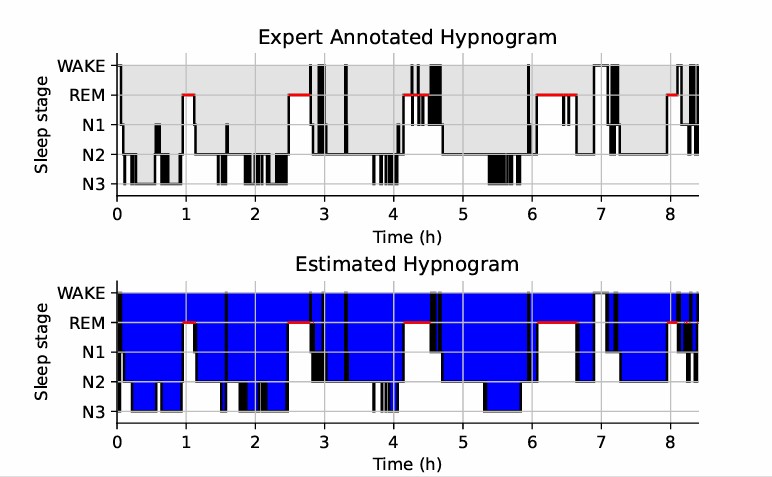
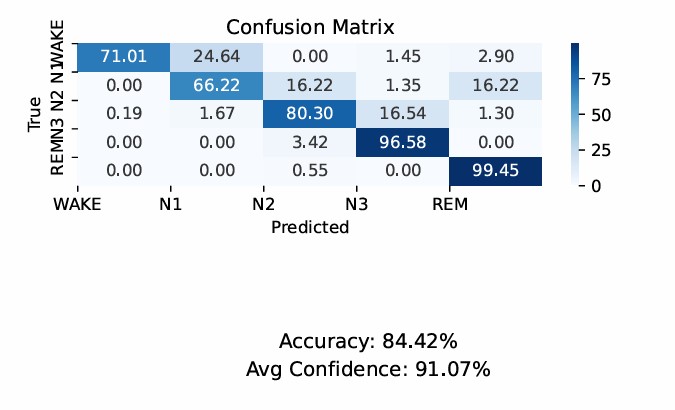
Figure 1: The exported results of the YASA sleep scoring tool
References
[1] Vallat, R., & Walker, M. P. (2021). An open-source, high-performance tool for automated sleep staging. Elife, 10, e70092.
Version History
- v0.1.0Distributed with CEAMS package version 7.2.0 — Snooz beta 2.0.1
Initial release of the tool.
- v2.3.0Distributed with CEAMS package version 7.3.0 — Snooz beta 3.0.0
Supports discontinuous files.
Generates Hypnodensity plots.