Information
At this point, we assume you are familiar with the Developer Installation, know how to Run Snooz from the source code, and have had a chance to Explore examples.
You are looking for more information about the Snooz architecture. Here some additional information about the Packages, Tools, Modules and Apps.
Architecture
Meet the managers
Managers in Snooz are the core of the application. Each manager oversees a specific set of related features. For instance, the PackageManager handles loading and unloading packages and package items, while the ContentManager displays the content managed by other managers, such as the ProcessManager, the ToolManager, and the AppManager.
Interractions between managers
Diagrams of the interactions between managers are presented below.
User clicks on a tool in the menu and another tool was already loaded :
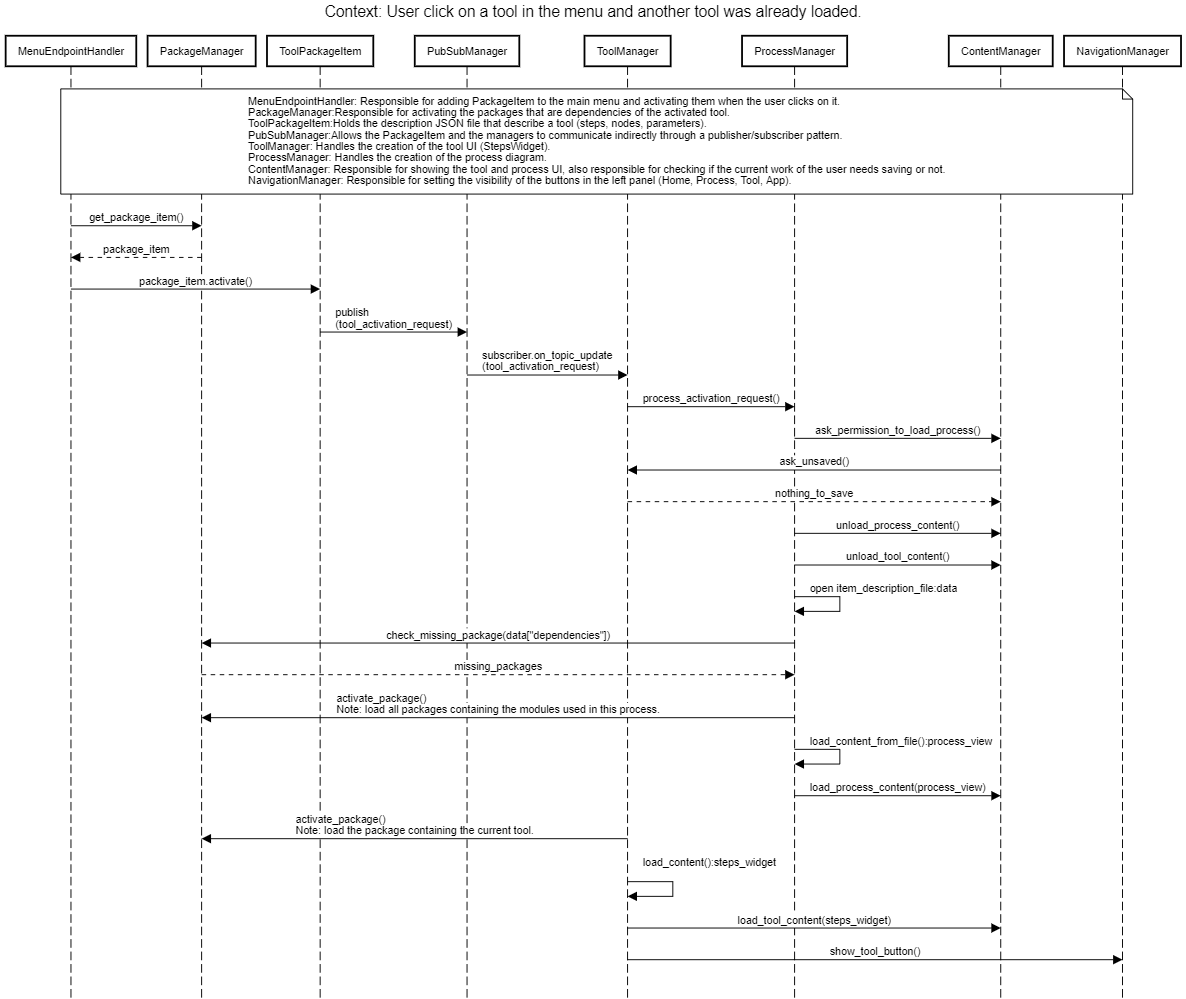
A tool is being loaded after the user clicks on it in the menu.
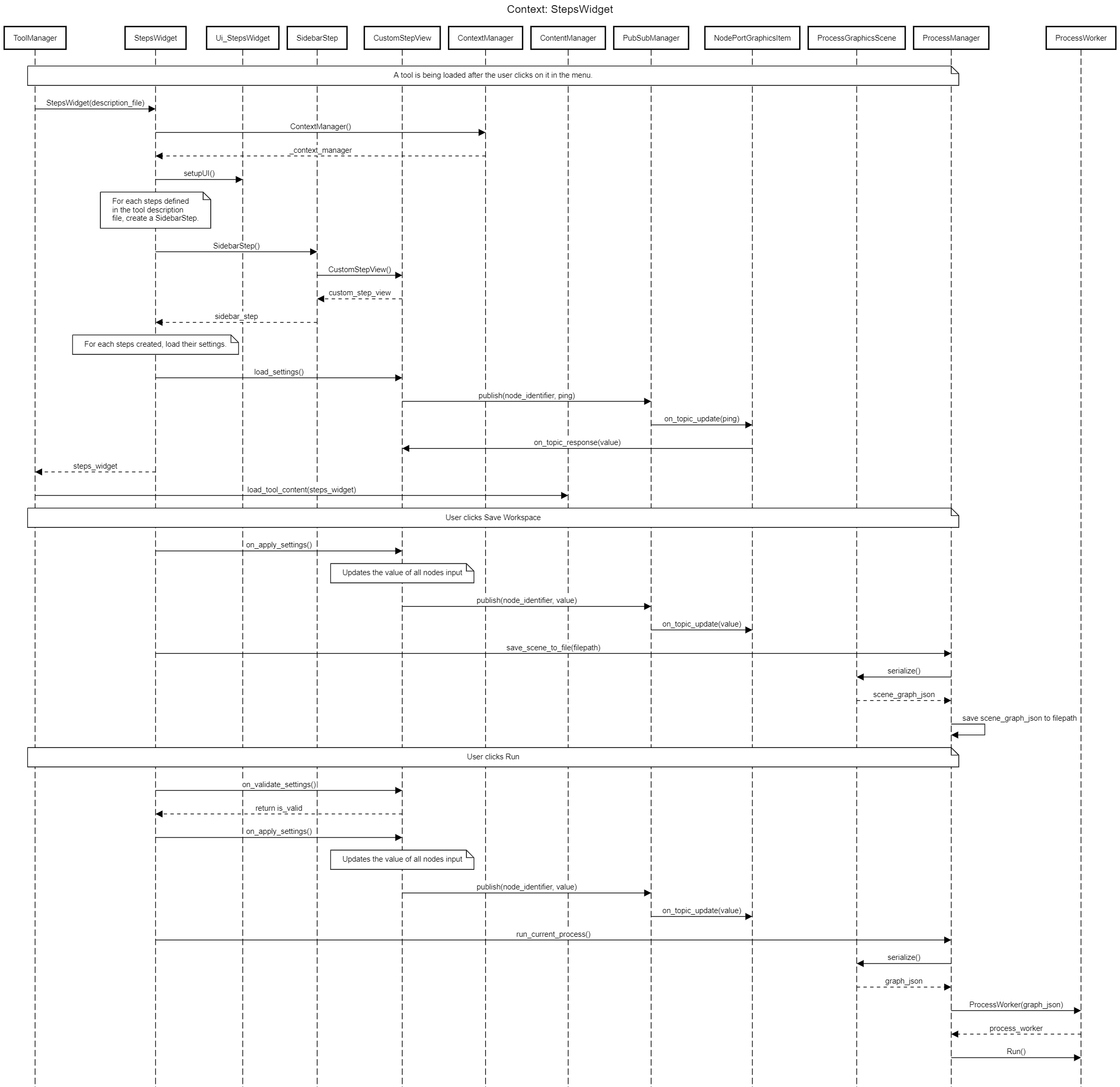
How module, tool, app and package versioning works
The main purpose of versioning is to ensure the ability to reproduce past analyses, even if new developments alter how modules and tools function. The idea is to increment the version (in XX.XX.XX format) of the modules, tools, apps, and packages involved in a design modification, ensuring the old design remains intact and usable with the previous version.
The versioning format with three digits (i.e., 01.02.03) indicates the significance of a modification. To guide users on how to increment the version (XX.XX.XX format), the following rules apply:
Modules: INPUT/OUTPUT.VALUES.INTERNAL
Tools: INPUT/OUTPUT.VALUES.INTERNAL
Apps: INPUT/OUTPUT.VALUES.INTERN
Packages: ARCHITECTURE.NEW TOOLS/MODULES.MODIFIED TOOLS/MODULES
Modules
For Modules, follow these rules:
INPUT/OUTPUT: If you add or remove an input/output port from your module increment the INPUT/OUTPUT number, and reset the INTERNAL and VALUES numbers to zero. (e.g., INPUT/OUTPUT.XX.XX, so 0.1.2 -> 1.0.0).
VALUES: If your changes modify in ANY WAY the output values of the module or the expected values for the inputs, increment the VALUES number, and reset the INTERNAL number to zero (e.g., XX.VALUES.XX, so 1.1.1 -> 1.2.0).
INTERNAL: If your changes only affect the internal workings of the module and has no external impact, increment the INTERNAL number (e.g., XX.XX.INTERNAL, so 0.0.0 -> 0.0.1).”
Tools
For Tools, follow these rules:
INPUT/OUTPUT: If you add or remove input files, parameters, or generated events/reports from your tool, increment the INPUT/OUTPUT number and reset the VALUES and INTERNAL numbers to zero (e.g., INPUT/OUTPUT.XX.XX, so 0.1.2 -> 1.0.0).
VALUES: If your changes modify in ANY WAY the generated events/reports of the tool or the expected values for the parameters, increment the VALUES number and reset the INTERNAL number to zero (e.g., XX.VALUES.XX, so 1.1.1 -> 1.2.0).
INTERNAL: If your changes only affect the internal workings of the tool (e.g., adding/removing a step or updating module versions) and have no external impact, increment the INTERNAL number (e.g., XX.XX.INTERNAL, so 0.0.0 -> 0.0.1).
Apps
For Apps, follow these rules:
INPUT/OUTPUT: If you add or remove input files, parameters, or generated events/reports from your app, increment the INPUT/OUTPUT number and reset the VALUES and INTERNAL numbers to zero (e.g., INPUT/OUTPUT.XX.XX, so 0.1.2 -> 1.0.0).
VALUES: If your changes modify in ANY WAY the generated events/reports of the app or the expected values for the parameters, increment the VALUES number and reset the INTERNAL number to zero (e.g., XX.VALUES.XX, so 1.1.1 -> 1.2.0).
INTERNAL: If your changes only affect the internal workings of the app (e.g., adding or removing a feature in a viewer) and have no external impact, increment the INTERNAL number (e.g., XX.XX.INTERNAL, so 0.0.0 -> 0.0.1).
Packages
For Packages, follow these rules:
ARCHITECTURE: If the API version of Snooz changes and it impacts how packages, tools, modules, or apps are handled, increment the ARCHITECTURE number and reset the other two numbers to zero (e.g., ARCHITECTURE.XX.XX, so 0.1.2 -> 1.0.0).
NEW TOOLS/MODULES/APPS: If there are new tools, modules, or apps, increment the NEW TOOLS/MODULES/APPS number and reset the MODIFIED TOOLS/MODULES/APPS number to zero (e.g., XX.NEW TOOLS/MODULES/APPS.XX, so 1.1.1 -> 1.2.0).
MODIFIED TOOLS/MODULES/APPS: If you update tools, modules, or apps, increment the MODIFIED TOOLS/MODULES/APPS number (e.g., MODIFIED TOOLS/MODULES/APPS.XX, so 0.0.0 -> 0.0.1).
CEAMS packages
To simplify versioning management, the CEAMS packages, which include CEAMSModules and CEAMSTools, are updated synchronously. Since updated modules are typically used in tools, with each release of the CEAMS packages, we increment the version of both packages.
For example, if the last release version of the CEAMS package is 6.9.0, both CEAMSModules and CEAMSTools will have version 6.9.0. If we are fixing issues with a specific tool, we create a developmental version of the CEAMS package, such as 6.9.1. Users can add and activate this developmental package to validate our modifications. Once validation is complete, the fixes will be included in the next Snooz release. Multiple fixes or added tools may be incorporated into the developmental version before the final release.
Our approach is to increment the version of both CEAMSModules and CEAMSTools to 6.10.0 for the next Snooz release.
Package item interaction with endpoints and hooks
Snooz is a highly flexible application. Endpoints and hooks were designed to facilitate communication between Apps and Tools, but this concept has been extended throughout the application to manage the interaction of PackageItems (Modules, Tools, Apps) with the core Snooz application.