Detect Slow Waves
This tool detects slow waves, on specific sleep stages, with the algorithms inspired from (Bouchard et al. 2021) [1]
The detection criteria are editable, but below are the default ones, along with a schematic of a typical slow wave signal to help the user understand the slow wave characteristics included in the output report.
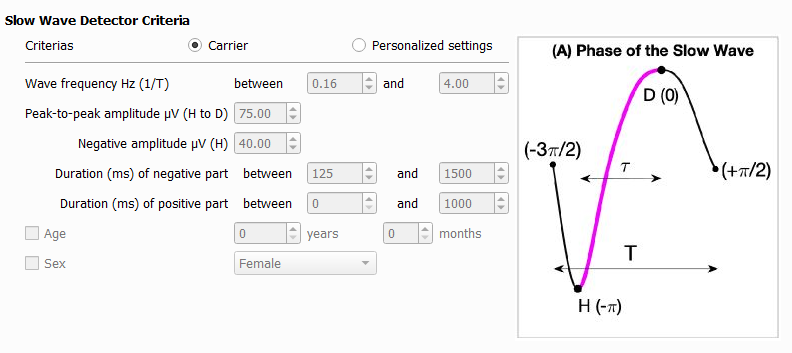
The slow wave events detected are added into the accessory file (.tsv, .STS or .ent).
The event information is :
group : the group of the event.
name : the name of the event.
start_sec : the onset of the event in seconds (time elapsed from the lights off).
duration_sec : The duration of the event in seconds.
channels : The list of channels on which the events occurs.
Three additional output reports are available :
- 1. Slow wave characteristics by event level
Files with the signal characteristic of each slow wave event. One file per recording, one row per event.
The characteristics included are :
peak-to-peak amplitude (µV) corresponds to H to D on the image (A)
duration (s) corresponds to T on the image (A)
frequency (Hz) corresponds to 1/T on the image (A)
negative peak amplitude (µV) correspond to H on the image (A)
negative duration (s)
positive duration (s)
transition frequency (Hz) corresponds to 1/(2 tau) on the image (A)
- slopes (µV/s)
from the 0 crossing to the min of the negative component
from the min of the negative component to the max of the positive component
from the max of the positive to the 0 crossing
- 2. Sleep stages
Files with the sleep stages selected for detection (useful to compute the slow wave density per division of the night). One file per recording, one row per sleep satge.
- 3. Slow wave characteristics averaged by subject level
A file with the slow wave characteristics averaged per subject. One file for the cohort, one row per channel.
The characteristics included are :
slow wave count
- the average slow wave characteristics listed above
total (all selected stages)
per sleep stage
per sleep cycle
per clock hour
per hour spent in each sleep stage
See Slow wave cohort report for the variable definition.
Note
The Three outputs are needed for the slow wave classifier.
Filter Information
The filter used in the Slow Wave detector is a Butterworth design implemented in second-order-section (SOS) form and applied using bidirectional zero-phase filtering. This approach preserves the requested magnitude response while eliminating phase distortion.
Bandpass filter parameters:
Type: IIR bandpass
Family: Butterworth
Frequency band: 0.16 Hz to 4 Hz
Order: 30 (internally halved before the forward/backward pass)
Form: second-order sections (SOS)
Application: bidirectional zero-phase filtering (filtfilt)
Steps
1 - Input Files
Start by opening your PSG files (.edf, .sts or .eeg).
European Data Format (EDF) :
The corresponding .tsv file is required with .edf. Both files must be saved in the same directory and share the exact same filename.
Stellate format (up to version 6.2) :
The corresponding .sig file is required with the .sts. Both files must be saved in the same directory and share the exact same filename.
NATUS format (version 9.1) :
(CEAMS users only) The entire NATUS subject folder is required.
For more details on accepted formats, see Polysomnography file format.
2 - Non valid events
Select events to disable the slow wave detection.
Warning
Artefacts must be previously detected and saved in the accessory file.
3 - Detection Criterias
Choose the criteria to detect slow wave and select the sleep stages you want to detect slow wave in.
4 - Output Files
Select which reports to generate.
Report
References
[1] Bouchard, M., Lina, J.-M., Gaudreault, P.-O., Lafrenière, A., Dubé, J., Gosselin, N., Carrier, J., 2021. Sleeping at the switch. Elife 10, e64337. https://doi.org/10.7554/eLife.64337
Version History
- v2.1.0Distributed with CEAMS package version 7.2.0 — Snooz beta 2.0.1
Initial release of the tool.
- v2.6.0Distributed with CEAMS package version 7.3.0 — Snooz beta 3.0.0
Remove REM periods by default when detecting Slow Waves.
Slow Wave Density has been added to the Slow Wave report.
Refactored the output report to distinguish between elapsed clock time and sleep-stage time.
Added new variables representing the combined N2 + N3 stages.
Events are discarded during non-specific channel artifacts.
Fixed reporting of events starting at sleep stage transitions.
Replaced the IIR delta passband filter with a FIR filter using a Hamming window to match the legacy tool.
Improve path, filename, and extension handling for sleep cycle warning log file.