Report Sleep cycles
This tool computes and report the sleep cycles.
Definition of Sleep Cycles
Sleep cycles typically last around 90 minutes to 2 hours, during which time the brain cycles from slow-wave sleep to REM sleep. Sleep cycles are succession of NREM-REMs periods.
Definition of NREM Period (NREMP)
First NREMP : begins at the first NREM stage of the recording.
Central NREMPs : begin at the next NREM stage following a REMP end.
The NREMP ends at the start of a REMP.
REM Period (REMP)
The REMP ends when there are 15 min without an R stage (except at the last cycle).
The end is defined as the last R stage of the REMP or the beginning of the next NREMP.
The REMP begins at the first stage R.
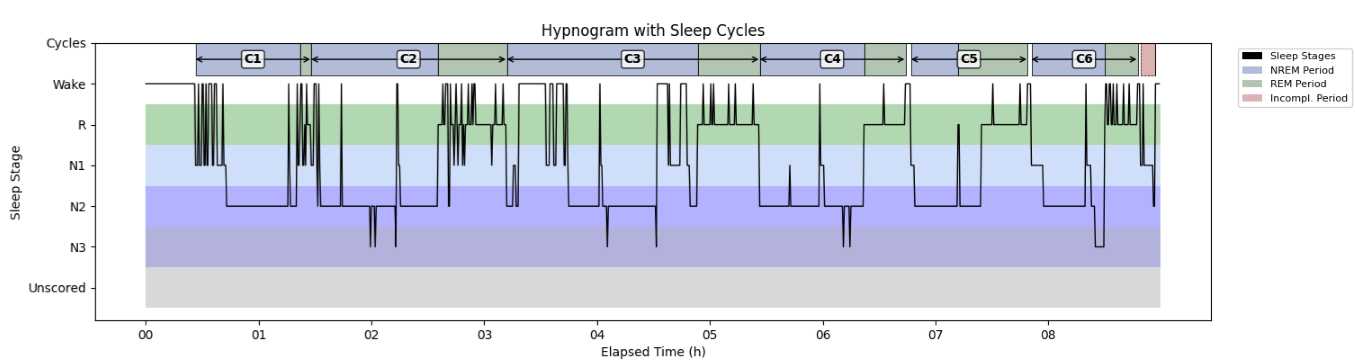
The hypnogram below shows six complete sleep cycles (NREMP + REMP) and one incomplete cycle at the end of the night. The Y-axis indicates sleep stages, and the X-axis shows time from recording start (hours). Cycles 1-6 are labeled above the hypnogram (e.g., C1-C6); the final incomplete cycle is unlabeled. NREM periods appear in blue and REM periods in green.
Steps
1 - Input Files
Start by opening your PSG files (.edf, .sts or .eeg).
European Data Format (EDF) :
The corresponding .tsv file is required with .edf. Both files must be saved in the same directory and share the exact same filename.
Stellate format (up to version 6.2) :
The corresponding .sig file is required with the .sts. Both files must be saved in the same directory and share the exact same filename.
NATUS format (version 9.1) :
(CEAMS users only) The entire NATUS subject folder is required.
2 - Cycle Definition
Select or edit your sleep cycle criteria.
3 - Output Files
Sleep Cycle Cohort file :
The start and duration (s) of each NREM and REM period are saved in a .tsv (tab separated values) file defined by the user.
The file includes 5 columns : group, name, start_sec, duration_sec and channels.
Each row corresponds to a period and the group identifies the PSG recording.
New PSG recording are added in the .tsv file if it exists otherwise it is created.
Sleep Cycle specific to each PSG opened:
The hypnogram of each PSG is saved in a .png picture file
The sleep stages and sleep periods events are saved in a .tsv file
Version History
- v2.1.0Distributed with CEAMS package version 7.2.0 — Snooz beta 2.0.1
Initial release of the tool.
- v2.4.0Distributed with CEAMS package version 7.3.0 — Snooz beta 3.0.0
Refactor hypnogram plotting to use contours instead of filled bars, and add background colors.
Fix Aeschebach method to support two REMPs without NREM between.
Improve path, filename, and extension handling for sleep cycle warning log file.