Tools
This section describes how to use tools within Snooz.
Accepted file formats
Polysomnography file format
The only accepted format for polysomnography is the European Data Format (EDF). For more details, see European Data Format. Snooz can also read signals from the EDF+ format; however, annotations must be imported from the EDF+ file into a .tsv (Tab-Separated Value) format compatible with Snooz. See Import EDF Plus Annotations for more details.
Note
CEAMS users have access to two additional PSG file formats:
Harmonie (up to version 6.2): The signal recording file is a .SIG file, while the accessory file for sleep staging and annotations is a .STS file.
NATUS (version 9.1): The entire recording folder is required. This folder typically includes files such as .eeg, .ent, .epo, among others.
Annotations file format
The columns of the annotations file are as follows:
group : The category of the annotation (annotations with different names can be grouped into the same category), e.g. artifact
name: The text label of the annotation, e.g., art_snooz
start_sec: The onset of the annotation in seconds, e.g., 300
duration_sec : The duration of the annotation in second, e.g., 30
channels : The list of channels on which the annotation occurs, e.g., [‘LOC’, ‘ROC’]
To have an example of the Snooz annotations file see Snooz_accessory_file.tsv
The Snooz accessory .tsv file is human-readable and can be opened in any text editor or spreadsheet application (such as Excel). Items are separated by tabs, and decimal points are marked with a dot. The encoding format is UTF-8.
Item separator : t
Decimal separator : .
Encoder format : UTF-8
Many converters have been implemented in Snooz in order to create the Snooz accessory file for your cohort. I recommend exploring the preprocessing category to see if your annotation files can be converted into Snooz accessory files. The Snooz accessory file can be imported in the open-source universal viewer EDFbrowser. For more details, see EDFbrowser compatibility.
Navigate in the step-by-step interface
Here is an example of an empty tool to show you around.
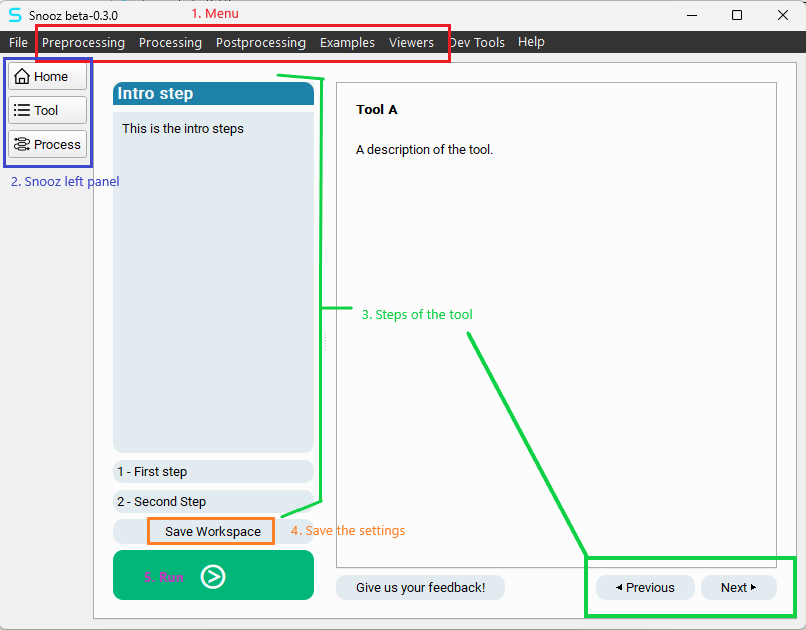
1. Launch the tool from the menu bar of Snooz.
2. The Snooz left panel allows you to navigate across views.
Note
Home : The Snooz Home page with the recents files list.
Tool : The step-by-step interface for the current tool.
Process : The pipeline with the interconnected modules.
3. The steps panel and the “Previous” and “Next” buttons allow you to navigate through each step of the tool.
Note
The introduction step is the home page of the tool. It describes how to use it.
The number of steps is specific to each tool.
Each step describes what the user must define as settings.
4. The user can save the workspace (.json file) at any moment. The workspace includes all the settings defined by the user in the current tool.
5. Press the green push button to run the tool.
Warning
The user will be informed if a required setting for the run has not been defined by the user.
Load workspace
To open a previously saved workspace, navigate to the menu File -> Load Workspace.
Select the .json file via the browse window and press “Open”.
Warning
The .json file includes the API version of Snooz (
package_api_version": "1.0.0") and all the package dependencies, if any. Make sure to use a valid workspace for the version of Snooz installed.